Episode 38: Exporting and Compressing Footage

January 21, 2012

in Podcast Episodes,Software,Tutorials

I was just asked on Vimeo how I export and compress my projects. Thought I’d share my process with all of you. What do you use?

Like I mentioned in the video I go from FCP > Mpeg Streamclip. You can get a copy of Mpeg Streamclip here.

Also check out my settings below the video.
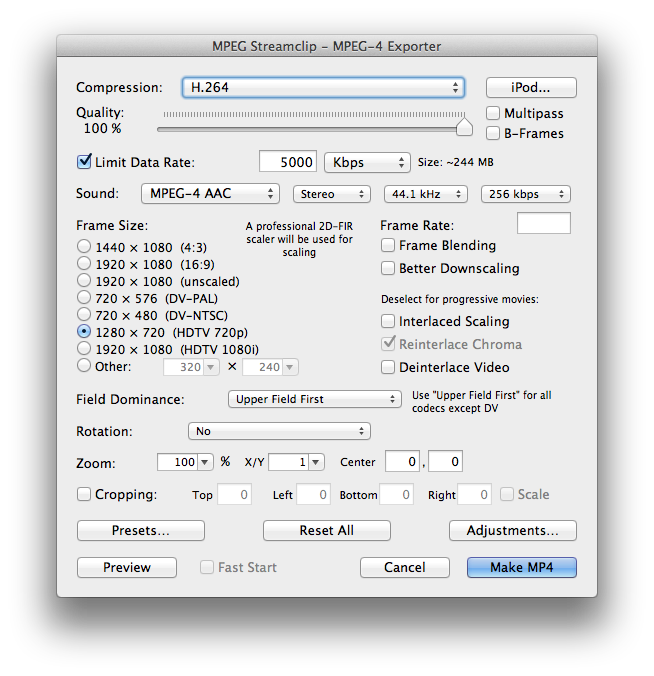

Quicktime File.

  • Steve

    Thanks for sharing Caleb!  I also use MPEG Streamclip but I start with a self-contained high resolution master video file exported out of FCP  instead of the smaller reference movie but otherwise my steps are largely the same as yours.  I just started using Presets myself, saves a few seconds.

  • http://dslrvideoshooter.com calebpike

    Self-contained and non Self-contained have the same resolution and quality. The only difference is you are creating a huge file, whereas I am just creating a small temp file. Its just as good as a Self-contained.

  • Sorin Amzu

    I started using Prism Convertor from NCH Software. Doesn’t MPEG Streamclip sort of darken the image? Like apply some sort of LUT curve on top of your original file? Prism offers a lot more formats, which I enjoy when I need a specific size or speed. Thanks for the settings.

  • http://twitter.com/FilmBarrie Brent Barrie

    Damn, I typed out this whole thing on using FCP and just setting it up the same for the same results with a smaller Kbits rate (.999), but you make a good point about using MPEG to be able to get back to working with FCP. You’ve got me beat there, I’m usually working on one project at a time, so I’ve always used FCP’s quicktime exporter exclusively.

    I’ll remember this tip in the future, thanks Caleb.

    -Brent

  • Steve

    That’s true as long as nothing happens to your FCP project file or its resources.  I like the “safety” of having a fully self contained master file that I can back up if I ever need to get back to it, but that’s just my process

  • BrotherBloat

    that’s cool – I never would’ve thought that your bitrate was ‘only’ 5kbps – I shall switch to that from my 7 for 720p projects! :)

  • Joel

    Rendering interlaced for web playback?

  • Pingback: DSLRVideoShooter.com: MPEG Streamclip Workflow | Kelly On A Tangent

  • http://dslrvideoshooter.com calebpike

    Glad to be of service.

  • http://dslrvideoshooter.com calebpike

    For sure. If you are in a unstable editing environment, or a multi-user environment than self-contained is the way to go.

  • http://dslrvideoshooter.com calebpike

    Is this a question? I don’t work with interlaced footage.

  • Ayospare

    what if you don’t have mpeg streamclip? is there anything else you can use to convert besides compressor?

  • http://dslrvideoshooter.com calebpike

    Quicktime would work.

  • Bob M.

    Can you give us iTunes – Podcast preset details too? :)

  • Brody Sakazaki

    This is awesome! Thank you so much! I used to compress and export through FCP7 only, but now I am going to start using MPEGSC to speed up my workflow process! I will take a look at the quality in your Vimeo channel. Thanks again.

  • http://www.facebook.com/carti.com.br Eduardo Gasparetto

    I would like to get the itunes contiguration too. Im starting a podcast and it would be helpfull. Congrats for your podcast.

  • http://dslrvideoshooter.com calebpike